Snugle: A Display Font for Creative and Cheerful Projects
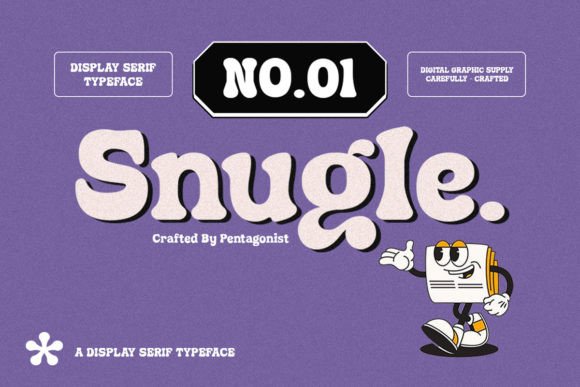
When it comes to design, the right font can elevate a project from ordinary to extraordinary. Snugle is a display font that stands out with its funky, cool, and aesthetically pleasing characteristics. Ideal for cheerful topics and children's themed designs, Snugle brings energy and visual appeal to any creative endeavor. Whether you're working on branding materials, educational content, or marketing campaigns, this font offers a unique touch when paired with bright colors and playful elements.
Understanding the Role of Snugle in Design Workflows
Snugle isn’t just another typeface; it’s a strategic choice in the broader context of a design workflow. As a display font, it excels at drawing attention and creating a strong visual identity. This makes it especially valuable in projects where personality and engagement are key. Before beginning a design project, consider whether your theme calls for bold, expressive typography. If so, Snugle could be an excellent fit.
During the planning phase of a creative task, choosing the right font helps set the tone and aligns with the overall message. For instance, if you’re designing a kids’ birthday invitation, using Snugle can instantly make the piece feel more fun and lively. It works well as a headline or title font, allowing other parts of the layout to remain clean and readable with complementary sans-serif or serif fonts.
Integrating Snugle into Pre-Design Planning
Incorporating Snugle into your process often starts before the actual design begins. When brainstorming themes or color palettes, think about how typography will support the mood you want to create. Snugle pairs beautifully with vibrant hues like yellow, orange, and turquoise—colors commonly used in children’s media, social media posts, and promotional materials.
- Theme Matching: Use Snugle for designs that require a youthful or energetic vibe.
- Brand Personality: Align the font with brands that prioritize creativity and positivity.
- Color Coordination: Plan ahead by selecting bright and engaging color schemes that highlight Snugle’s character.
Using Snugle During the Design Execution Phase
Once you've chosen your tools and assets, implementing Snugle becomes a matter of fitting it seamlessly into your composition. Its PUA encoding ensures that all glyphs and ligatures are easily accessible, which is a huge advantage during execution. This means you don't have to manually hunt for special characters—you can simply use them as needed within your design software.
For digital designers using Adobe Photoshop or Illustrator, installing Snugle and accessing its full range of symbols through the Glyphs panel can streamline the process. In Canva, once installed, the font appears in your custom font list and can be applied directly to text boxes. These features allow for efficient iteration and experimentation, making it easier to refine your layouts without getting bogged down by technical limitations.
Here’s a quick example of a practical workflow:
- Select a project requiring a bold, cheerful typographic style.
- Install Snugle and ensure compatibility with your design tool (e.g., Figma, Sketch, or Affinity Designer).
- Use Snugle for headlines or titles, and pair it with a secondary font for body text.
- Experiment with color combinations and spacing to enhance readability and visual harmony.
- Review the design for consistency and adjust as necessary for final output.
Post-Design Considerations and Long-Term Use
After completing a design, it's important to evaluate how effectively Snugle contributes to the project’s goals. Does it reinforce the intended message? Is it legible across different platforms and screen sizes? These questions help determine whether the font was the best choice and guide future decisions in similar projects.
Snugle also plays a role in long-term brand consistency. If you choose it as part of your brand’s visual language, make sure to document its usage guidelines. Define when and where it should appear—such as only in headers or promotional banners—to maintain a cohesive look across all materials. This documentation supports usability and ensures that team members or freelancers follow the same standards when applying the font later on.
Compatibility and Usability Across Platforms
One of the strengths of Snugle is its broad compatibility. Once properly installed, it works across major operating systems and design applications. However, always verify that the font displays correctly on the end-user platform, such as websites or mobile apps. If you're embedding Snugle into web projects, convert the text to outlines or use a web-safe fallback to avoid rendering issues on unsupported devices.
For print projects, ensure that the font is embedded in the final PDF or converted to vector paths to prevent missing characters. These steps are crucial for maintaining quality control, especially when handing off files to clients or printers.
Real-World Applications and Workflow Examples
Snugle shines in specific use cases where aesthetics and engagement are priorities. Here are a few scenarios where it might be particularly useful:
- Marketing Materials: Use Snugle for eye-catching posters, flyers, or social media graphics promoting events, products, or services aimed at families or young audiences.
- Children’s Publications: Apply it in book covers, chapter titles, or illustrations to add charm and visual interest.
- Event Branding: Incorporate Snugle into logos, signage, or invitations for birthdays, school functions, or community gatherings.
- Product Packaging: Add a whimsical flair to packaging for toys, snacks, or novelty items by leveraging its distinctive letterforms.
Consider a scenario where a small business owner is launching a new line of organic baby clothes. They want the branding to reflect joy, care, and eco-friendliness. By using Snugle for the product names and pairing it with soft pastel colors, they create a warm yet modern aesthetic that appeals to their target audience. The font’s quirky style reinforces the brand’s personality while remaining professional enough for retail settings.
Combining Snugle with Other Tools and Resources
To maximize the impact of Snugle, integrate it with complementary resources. Pair it with high-quality illustrations, photography, or animations that share its playful tone. In branding projects, combine it with tools like brand style guides or mood boards to ensure alignment across all visual elements.
If you're working on a digital campaign, consider how Snugle will interact with responsive design principles. Test it on various screen sizes to confirm that it scales well and remains visually appealing. In email marketing, for example, keep the font size large enough for easy reading on mobile devices, and limit its use to short phrases or call-to-action buttons.
Best Practices for Implementation
While Snugle is a powerful asset, its effectiveness depends on thoughtful implementation. Here are some tips to get the most out of it:
- Layer Smartly: Use Snugle as a focal point rather than throughout the entire design. Balance it with simpler fonts to avoid overwhelming the viewer.
- Test Early: Preview the font on different backgrounds and in various sizes before finalizing a layout.
- Stay Organized: Keep your design files tidy by naming layers clearly when using Snugle, especially if multiple styles or glyphs are involved.
- Document Usage: Maintain a style guide that includes instructions for using Snugle in different contexts to ensure consistency over time.
Another consideration is licensing. Always confirm that you have the appropriate rights to use Snugle in your intended application—whether personal, commercial, or for client work. Some fonts may restrict use in certain environments, so knowing these details upfront avoids potential legal issues and keeps your workflow smooth.
Observations and Outcomes
From experience, Snugle tends to perform best in projects where visual storytelling is essential. Its unique curves and stylized characters evoke a sense of playfulness that resonates with both creators and end-users. Marketers who’ve used it report higher engagement rates in campaigns targeting younger demographics or family-oriented audiences.
However, it’s not a one-size-fits-all solution. Overusing Snugle or applying it in inappropriate contexts—like financial reports or formal presentations—can detract from professionalism. The key is to match the font to the purpose and audience of the project.
Workflow Optimization Tips
For those managing multiple design tasks, having a system for font selection can save time and improve efficiency. One approach is to categorize fonts by function—such as “display,” “headings,” or “body text”—and assign Snugle to the display category. This way, you can quickly reference it whenever a project requires a bold, expressive typeface.
Automating parts of the process also helps. For example, if you frequently use Snugle in social media templates, create reusable components or saved presets in your design tool. These can include default font sizes, color variations, and spacing adjustments tailored to common use cases. This not only speeds up your work but also ensures consistent results across all outputs.
Getting Started with Snugle
If you’re ready to incorporate Snugle into your work, start by identifying the types of projects it would enhance. Download the font and install it on your computer. Then, test it in a few sample designs to see how it interacts with your preferred tools and color schemes.
As you experiment, take note of what works and what doesn’t. Are there particular glyphs that stand out? How does it affect the hierarchy of information in your layout? These observations help build a better understanding of how to apply Snugle effectively in future workflows.
Finally, remember that fonts are just one element of good design. While Snugle adds character, it must be supported by solid visuals, clear messaging, and thoughtful structure. Treat it as a tool that enhances your ideas rather than defines them.
Conclusion
Snugle is a versatile display font that brings a sense of fun and vibrancy to design projects. Its PUA encoding simplifies access to decorative elements, making it user-friendly even for beginners. When integrated thoughtfully into workflows involving branding, marketing, education, or entertainment, it can significantly boost the visual appeal of the final product.
By considering its role in pre-design planning, execution, and post-project evaluation, you can ensure that Snugle serves its purpose efficiently and consistently. Whether you're an entrepreneur, educator, or creative professional, incorporating Snugle into your toolkit can open up new possibilities for expressing your ideas in a visually compelling way.