Kidmans: A Versatile Display Font for Creative Workflows
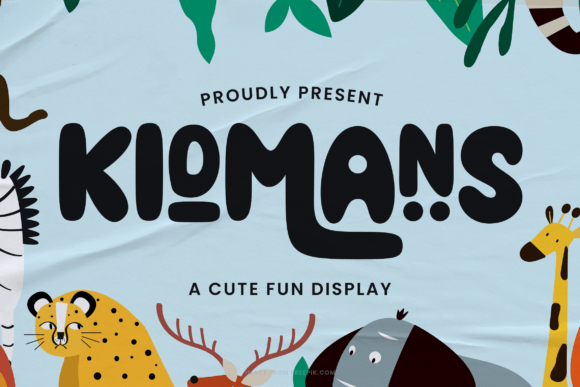
Kidmans is a display font that brings a sense of warmth, charm, and personality to any project. Designed with both digital and print applications in mind, it features a friendly and approachable style that works well in a variety of creative contexts. Whether you're crafting greeting cards, designing social media assets, or creating engaging presentations, Kidmans offers a unique visual identity that can elevate your work without overwhelming the message.
What Makes Kidmans Unique?
One of the standout qualities of Kidmans is its PUA encoding, which gives users easy access to an expanded set of glyphs, ligatures, and swashes. This means that even if your software doesn’t support advanced OpenType features automatically, you can still use these special characters through a simple keyboard shortcut. The result is a more expressive and polished look across different platforms and design tools.
Its playful yet professional appearance makes Kidmans ideal for branding projects, especially those targeting younger demographics or aiming for a more casual tone. The font strikes a balance between being eye-catching and readable, which is rare in many decorative typefaces. It’s not just about aesthetics—Kidmans helps maintain clarity while adding a touch of creativity.
Integrating Kidmans into Your Workflow
Incorporating Kidmans into your workflow requires thoughtful planning to ensure it complements your overall design and messaging goals. Here are some practical ways to leverage this font at different stages of a project:
Before Starting a Project
Preparation is key when choosing typography. Before diving into the design phase, consider how Kidmans will fit within your brand's voice or the tone you want to establish. For example, if you’re working on a children’s product label or a lifestyle blog post, Kidmans could serve as a headline font that immediately conveys a welcoming vibe.
- Review your existing brand guidelines or content strategy to see where a fun, cursive-style font would add value.
- Download and install the Kidmans font file to test it in your preferred design software.
- Pair it with a sans-serif or serif body font to maintain readability and contrast.
During the Design Process
Once installed, using Kidmans becomes a seamless part of your design process. Its PUA-encoded nature ensures compatibility across most modern design platforms like Adobe Photoshop, Illustrator, InDesign, Canva, and Figma. You can easily customize the font by adjusting spacing, size, and color to match your layout’s needs.
Here’s how you might use it effectively:
- Use it for titles and headers: Kidmans adds visual interest without sacrificing legibility, making it perfect for headlines in brochures, websites, or marketing materials.
- Create custom text elements: With its glyph variations, you can stylize phrases like “Thank You” or “Happy Birthday” to stand out in greeting cards or promotional content.
- Layer with other fonts: Combine Kidmans with a clean, minimalist font to highlight important information while keeping the rest of the text grounded.
A useful tip during implementation is to keep your text short and impactful. Because it’s a display font, longer blocks of text may become difficult to read. Use it strategically for emphasis rather than for large volumes of copy.
After Completion
Even after the initial design is done, Kidmans can play a role in final touches. If you're exporting graphics or preparing files for clients, double-check that the font renders correctly in all output formats. Some platforms may require embedding or converting the text to outlines to preserve the font's integrity.
Additionally, consider creating a style guide or template for recurring uses of Kidmans. This ensures consistency in future projects and reduces the need to reconfigure settings each time. For digital assets, storing commonly used text styles (like button labels or call-to-action phrases) can streamline your workflow significantly.
Real-World Use Cases for Kidmans
Display fonts like Kidmans thrive in environments where first impressions matter. Below are several scenarios where it can enhance your outcomes:
Crafting and Print Projects
If you're a hobbyist who enjoys making handmade items, such as scrapbooks, invitations, or T-shirts, Kidmans can add a personal flair. Its hand-drawn feel makes it ideal for DIY projects that aim to convey individuality and care.
Digital Marketing and Social Media
Marketers often rely on bold and memorable visuals to grab attention. When designing social media posts or email campaigns, using Kidmans for headlines or taglines can help create a distinctive look that stands out in crowded feeds.
Presentations and Slide Decks
For educators, entrepreneurs, or business professionals, slide decks benefit from a dynamic title font. Kidmans can be used to introduce sections, highlight key takeaways, or add a creative element to infographics and data visualizations.
Website Design and Branding
Web designers might find Kidmans useful in hero sections, logos, or call-to-action buttons. It can also be paired with bolder sans-serif fonts for contrast in landing pages or promotional banners. Just make sure it aligns with the website’s overall theme and usability standards.
Factors to Consider When Using Kidmans
While Kidmans is a powerful tool, there are several factors to keep in mind when implementing it into your work:
Compatibility and Accessibility
Ensure the platforms you're using support PUA-encoded fonts. Although most major design tools do, it’s always wise to test it in the specific environment before finalizing your project. Also, remember that accessibility should never be compromised—use alternative fonts for body text and avoid overusing decorative elements in critical information areas.
Organization and Efficiency
Keep track of where you’ve used Kidmans so that you can maintain brand consistency across multiple channels. Organizing your font library and saving preset styles in your design software can save time and reduce errors in repetitive tasks.
Quality Control
When working on high-stakes projects, such as client deliverables or official communications, review how the font looks across different devices and screen resolutions. Test print quality if applicable, and confirm that all glyphs appear correctly once deployed.
Long-Term Use
Think about whether Kidmans will remain relevant as your brand or project evolves. While it’s great for temporary promotions or seasonal themes, assess if it aligns with your long-term identity. Having a few go-to display fonts like Kidmans in your toolkit allows you to adapt creatively without losing coherence.
Practical Implementation Tips
To get the most out of Kidmans, follow these actionable suggestions:
- Use it sparingly to maintain visual hierarchy and prevent clutter.
- Adjust letter spacing slightly to improve legibility, especially in larger sizes.
- Experiment with color gradients or shadows to make the text pop, but don’t overdo it.
- Save frequently used combinations of Kidmans and supporting fonts as templates for quick reuse.
- Consider pairing it with icons or images to reinforce the message visually.
Another valuable practice is to create a sample document or mockup showcasing the different glyphs and stylistic alternates available in Kidmans. This serves as a reference for team members or clients, ensuring everyone understands the font’s capabilities and limitations.
How Kidmans Complements Other Tools and Resources
Kidmans integrates smoothly with a wide range of design tools and resources. For instance, when using graphic design software like Adobe Creative Cloud, you can pair it with vector illustrations to build cohesive layouts. In online design platforms like Canva or Crello, it enhances the aesthetic appeal of templates without requiring complex setup.
It also works well with other typographic techniques such as:
- Text layering and blending modes to create depth.
- Custom brushes or effects to simulate hand-painted or inked text.
- Font pairing generators to find complementary fonts quickly.
For developers, Kidmans can be embedded in web projects using @font-face declarations, provided the font license permits web usage. Always check licensing details to ensure proper compliance, particularly when deploying it on public-facing websites or apps.
Conclusion
Kidmans is more than just a pretty font—it’s a strategic asset in the right context. By understanding how to integrate it into your workflow, you can enhance your creative output without disrupting efficiency or readability. From pre-planning considerations to post-design checks, using display fonts like Kidmans thoughtfully ensures they contribute positively to your project’s outcome.
Whether you're a small business owner looking to refresh your logo, a designer working on a new campaign, or someone simply wanting to add a bit of character to their next greeting card, Kidmans offers a versatile solution that blends style and function. Keep your process clear, your implementation purposeful, and your results consistent, and you’ll find that this font becomes a trusted companion in your creative toolkit.