Dobba: A Modern Display Font with a Minimalist Edge
When it comes to typography, the right font can make all the difference in how your message is perceived. Dobba is a display font that has been gaining attention for its clean and contemporary aesthetic. Designed with versatility in mind, Dobba strikes a balance between bold visual impact and subtle elegance. Its minimalist vibe makes it an excellent choice for designers who want their text to stand out without overwhelming the overall composition. Whether you're crafting book covers, magazine layouts, social media graphics, or event invitations, Dobba offers a fresh approach to modern design.
Key Characteristics of Dobba
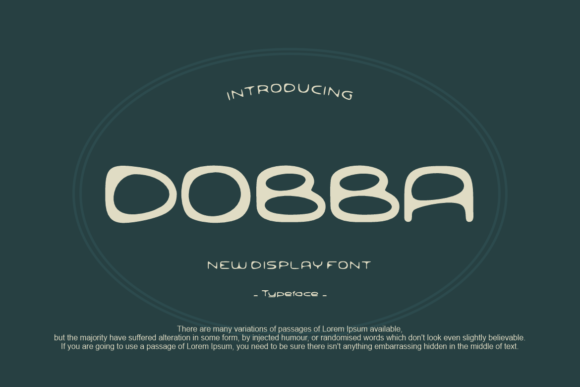
Dobba is a sans-serif display typeface with a geometric structure. It features evenly spaced characters, uniform stroke weights, and a high x-height, which together contribute to its legible yet stylish appearance. The font avoids unnecessary embellishments, making it ideal for projects where clarity and simplicity are key. While it's not suited for long passages of body text, Dobba excels in headlines, titles, logos, and short-form content.
One standout feature is its adaptability across different mediums. The font works well both digitally and in print, maintaining its crispness at various sizes. This flexibility is particularly useful for multi-platform branding efforts, where consistency is essential but environments vary widely.
Practical Applications and Use Cases
Designers often use display fonts like Dobba to create focal points within a layout. For example, a book cover might utilize Dobba for the title to draw the reader’s eye while allowing the supporting text to remain in a more traditional serif font. In editorial design, such as magazines or brochures, Dobba can serve as a headline font that complements photography and other visual elements without clashing.
Social media marketers also benefit from Dobba’s clean lines and strong presence. On platforms like Instagram or Pinterest, where visual appeal drives engagement, Dobba helps ensure that text-based posts are both attractive and easy to read. Its neutral tone allows brands to maintain a professional look while still feeling approachable and current.
Event planners and graphic designers working on invitations will appreciate Dobba’s ability to convey sophistication without being overly formal. It brings a sense of modernity to designs, aligning well with themes ranging from lifestyle events to corporate gatherings. The font’s lack of ornamentation ensures that it doesn’t distract from the imagery or background elements commonly used in invitation design.
Evaluating Dobba’s Strengths
The primary strength of Dobba lies in its readability at large sizes. Because it’s a display font, it’s optimized for visibility rather than subtlety. This makes it especially effective for signage, posters, and banners where quick recognition is important. Its consistent spacing and straightforward character shapes reduce cognitive load for viewers, helping them focus on the message rather than deciphering the text.
Another advantage is its neutral palette. Unlike some display fonts that lean heavily into retro or decorative styles, Dobba maintains a timeless feel. This neutrality allows it to pair well with a wide range of color schemes and design aesthetics, whether you're aiming for a sleek tech brand identity or a warm, nature-inspired layout.
Quality and Usability
From a technical standpoint, Dobba is well-constructed. It includes standard Latin characters and basic punctuation, which is sufficient for most English-language projects. However, users requiring extensive language support or special symbols may find it limiting. That said, for many creative professionals, this isn’t a major concern since Dobba is typically used for short, impactful text rather than dense paragraphs.
Its usability is further enhanced by compatibility with major design software and operating systems. Whether you're using Adobe Photoshop, Illustrator, Figma, or even Google Fonts (if available), Dobba integrates smoothly into most workflows. The font file itself is lightweight, which is beneficial for web designers looking to optimize loading times on digital platforms.
Flexibility and Consistency
Dobba demonstrates good flexibility in terms of styling. It works equally well in uppercase and lowercase settings, and its clean form adapts to both bold and regular weights when multiple variants are available. This variety gives designers more options to tailor the font to specific project needs without losing the core identity of the typeface.
Consistency across different weights and styles is crucial for any font, and Dobba performs admirably in this regard. If the font family includes additional styles—such as italic or condensed versions—they tend to retain the same geometric foundation and minimalistic charm. This makes it easier to build a cohesive typographic system around Dobba without introducing visual dissonance.
Who Benefits Most from Dobba?
While Dobba is a versatile font, certain audiences will derive the most value from it. Here are a few groups that might consider incorporating Dobba into their design toolkit:
- Graphic Designers: Those working on branding, packaging, and editorial layouts will find Dobba useful for creating modern, clean visuals.
- Marketers and Social Media Managers: Dobba’s legibility and style make it perfect for crafting engaging promotional materials and social media content.
- Bloggers and Publishers: When designing headers or pull quotes, Dobba adds a touch of sophistication without overpowering the rest of the page.
- Entrepreneurs and Small Business Owners: For startups and small businesses aiming to project a modern image, Dobba can help reinforce a clean, professional brand identity.
- Freelancers and Creators: Anyone producing digital assets—like website headers, app interfaces, or motion graphics—can benefit from Dobba’s clear and modern profile.
Real-World Performance and Limitations
In real-world applications, Dobba tends to perform best in controlled environments where the designer can manage contrast, size, and spacing effectively. For instance, when used on a white background with solid black text, Dobba looks crisp and powerful. However, if placed on a textured or busy background, its minimalist design might get lost unless properly balanced with negative space or contrasting colors.
Additionally, while Dobba is great for headlines and titles, it’s not recommended for extended reading. Its character width and lack of detailed serifs don't provide the necessary rhythm for comfortable body text. Using it in longer paragraphs could lead to visual fatigue and reduced readability.
How to Use Dobba Effectively
To maximize Dobba’s potential, consider these practical tips:
- Use it sparingly: Reserve Dobba for key elements like headings, logos, and call-to-action buttons. Avoid overusing it in body text or subheadings.
- Pair it with complementary fonts: Dobba pairs well with serif fonts for contrast and warmth, or with other clean sans-serifs for a unified, modern look.
- Test it across devices: Since Dobba is intended for display use, always check how it appears on mobile screens, tablets, and desktops to ensure it remains legible and impactful.
- Play with scale and weight: Experiment with larger sizes and bolder weights to emphasize its role as a visual anchor in your design.
- Consider context: Dobba may not be suitable for every design context. Evaluate whether its clean and friendly vibe matches the tone and purpose of your project.
Does Dobba Fit Your Needs?
If you're seeking a font that balances simplicity with personality, Dobba could be an excellent fit. It’s particularly valuable for those who prioritize a modern and approachable aesthetic in their work. But before committing, ask yourself a few questions:
- Do I need a font that works well at large sizes and in short bursts of text?
- Am I designing for digital or print, and does the font need to be compatible with both?
- Is my audience likely to respond positively to a clean, unembellished style?
- Will this font enhance the overall message and not detract from it?
Answering "yes" to these questions suggests that Dobba could be a strategic addition to your design resources. However, if your project requires intricate details, historical flair, or multilingual support, you might need to explore other options alongside Dobba.
Final Thoughts
Dobba is a display font that embodies the principles of minimalism and functionality. Its clean design and friendly vibe offer a refreshing alternative to overly ornate or traditional typefaces. While it may not replace your go-to body text font, it can elevate your headlines and key messaging in ways that are both subtle and effective.
For creators and professionals who value clarity, modernity, and a touch of personality in their typography, Dobba provides a reliable and aesthetically pleasing solution. As with any font, success depends on thoughtful application and alignment with your design goals. Used correctly, Dobba can become a signature element in your visual communication strategy, helping your content resonate more clearly and confidently with your audience.